NAS update 2026
A lot of homelab guides on youtube usually mention using something like proxmox, truenas, unraid, or something similar instead of using a bare image. These are great if you want an all in one managed solution or aren't that familiar with linux, or aren't a fan of fiddling.
On the other hand it's very easy to just use a plain old linux distro and I've been using linux for more than a decade. MergerFs and Snapraid are all you need to manage your drives and backups, and podman is (almost) all you need for containers (unless you are a nix sicko). This combination allows for:
NAS:
- Add new drives whenever
- Remove a drive whenever
- Use drives of different sizes
- Have de-duped backup snapshots
- No-need to reformat existing drives
OS:
- No abstractions
- Not locked into a specific OS or hypervisor, you can switch distros easily
- Just a straight up CLI
- Backup/drive pooling are just normal programs that can be removed, swapped, etc
I'll go through my new machine and how it's set up below!
New Machine
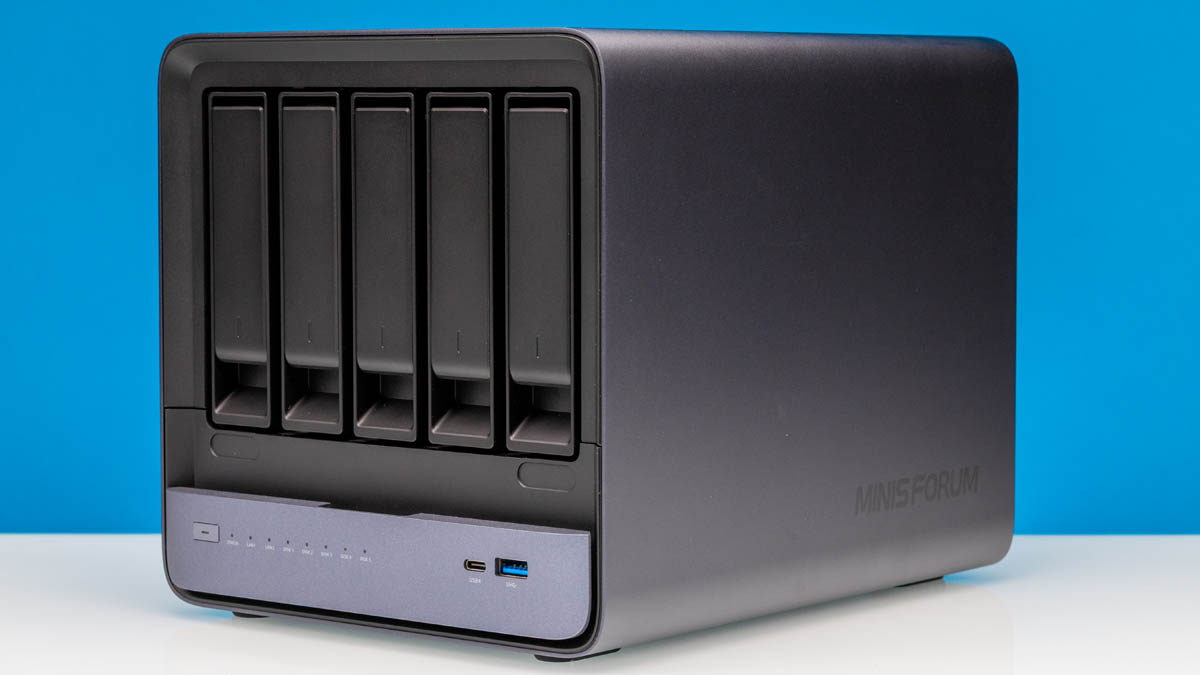
My old Nas was a large and quiet Fractal Define R5 running a intel i3 and ddr3 ram. It's still fine for just a NAS but I wanted to run more on it and have something newer to serve me the next 5-10 years. I also hate cable management, but the case is amazing and worth checking out if you want a quiet case with a lot of drives (and 2 hot swap bays!).
A few things I was looking for:
- Small and compact
- Easy to remove and add drives (Looking at you fractal node)
- Low idle if going with a prebuilt
- Large drive capacity
- Good / overkill I/O for the future
- Room for small GPU for transcoding Linux ISOs
After planning a Jonsbo case build I actually found and bit the bullet on a new machine from a company I never heard of, after some reputable youtubers revieiwed it, and bought a Minisforum N5 NAS . It's extremely overkill and still somehow a deal for $650. Check out these specs:
| Component | Spec |
|---|---|
| HDD Bays | 6 |
| NVME Bays | 3 |
| CPU | AMD Ryzen 7 255 (Binned chip) |
| RAM | 32GB DDR5-5600 SODIMM (aftermarket) |
| Network | 1x 10GB, 1x 5GB |
| Connections | 2xThunderbolt 4, Occulink! |
| PCIE Slot | Intel Arc A310 (Aftermarket) |
And it has relatively low idle. To take advantage of all 3 NVME slots you may have to get a smaller NVME to fit under it's internal fan.
Distro
I went with my old NAS distro, Fedora server. It's not a rolling release so it should be more stable and I've been a fedora user for a while. Fedora comes with a nice manager called Cockpit that is kind of a lightweight alternative to OMV. It has a nice webui for VMs, containers, storage, network rules, a terminal, etc.
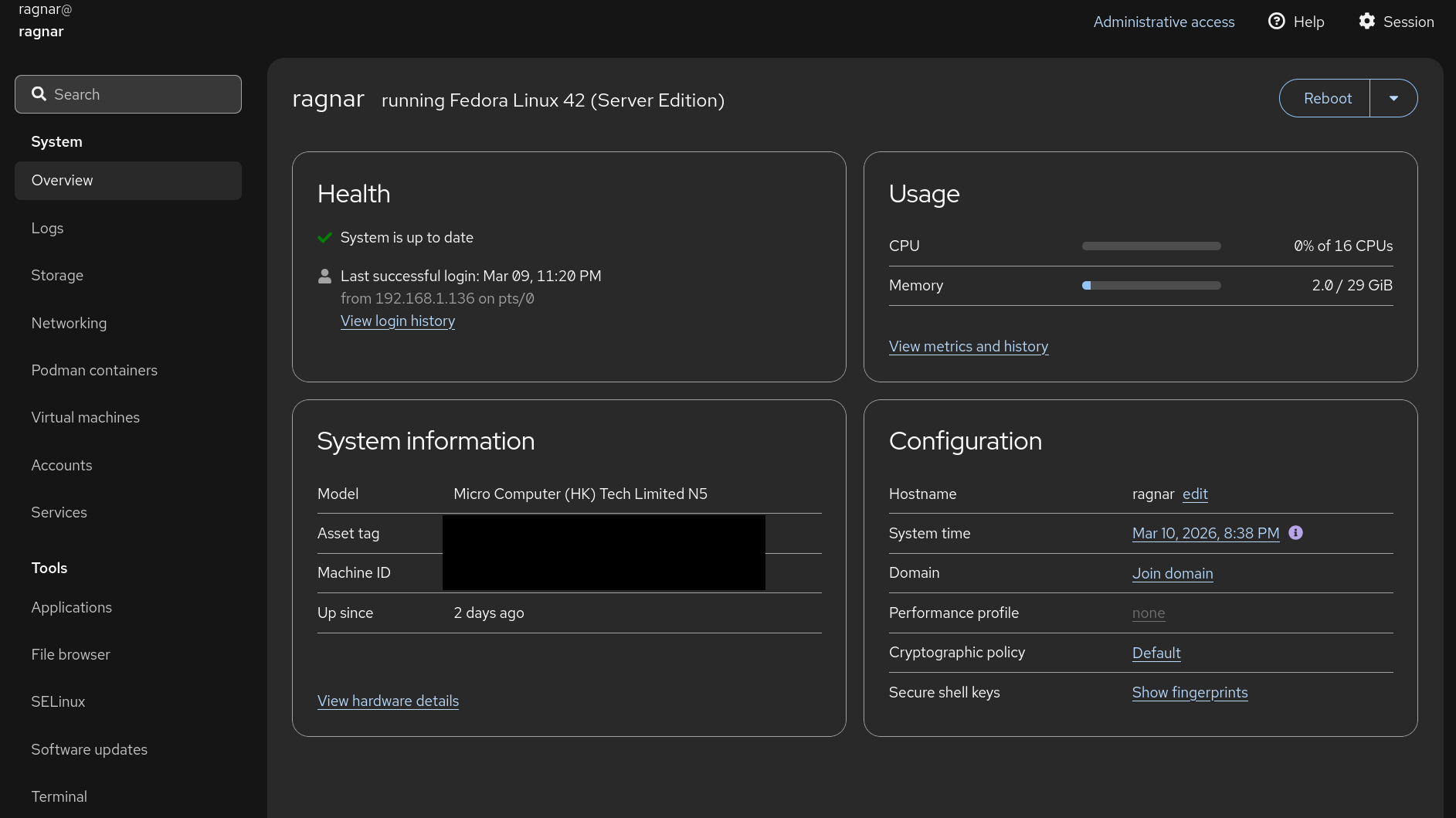
Nothing else other than maybe Debian tempted me. Maybe I'll try a Proxmox VM / actually using it one day, but I might save that for when I have an actual usecase for a powerful homelab.
Drive Pool Management and Backups
MergerFS
For managing all my linux ISO's and their backups I went with MergerFS combined with Snapraid. This is a great combo for a lazy way to pool drives together and back them all up without actually creating a raid array (meaning, you can have JBOD). MergerFS is an overlay filesystem that's as easy as adding an entry in your fstab to pool all your drives together into one view.
# Parity Drive
UUID=0 /mnt/parity ext4 defaults 0 0

#Storage Drives
UUID=1 /mnt/disks/disk1 ext4 defaults 0 0
UUID=2 /mnt/disks/disk2 ext4 defaults 0 0
UUID=3 /mnt/disks/disk3 ext4 defaults 0 0

# MergerFS overlay
/mnt/disks/disk* /pool fuse.mergerfs cache.files=off,category.create=mfs,func.getattr=newest,dropcacheonclose=false 0 0`
Snapraid
Snapraid is a backup program for disk arrays, which calculates parity bits between all your disks you tell it to, and combines it into a huge binary parity file. It also sits "on top" of your disks, meaning that you can choose to stop using it without any modification to your drives. It's simply an external program. Here's an example of a configuration that would work for the above drives:
# Where the file should be / what it's called
parity /mnt/parity/snapraid.parity

# Stores information on what's saved in each
content /mnt/disks/disk1/snapraid.content
content /mnt/disks/disk2/snapraid.content
content /mnt/disks/disk3/snapraid.content

# Tells snapraid the actual disks
disk d1 /mnt/disks/disk2/
disk d2 /mnt/disks/disk2/
disk d3 /mnt/disks/disk3

# Anything to exclude
exclude *.cache
From there you can run a few commands to create parity from your drives, and sync it. Usually, you'll just want to sync it when new files are added (I run a diff before hand to flag me if anything is deleted), and a scrub weekly or more often.
server@home:~$ snapraid -h
snapraid v13.0 by Andrea Mazzoleni, https://www.snapraid.it
Usage: snapraid status|diff|sync|scrub|list|dup|up|down|touch|smart|pool|check|fix [options]

Commands:
  status Print the status of the array
  diff   Show the changes that needs to be synchronized
  sync   Synchronize the state of the array
  scrub  Scrub the array
  list   List the array content
  dup    Find duplicate files
  up     Spin-up the array
  down   Spin-down the array
  touch  Add non-zero ns timestamps to files
  smart  SMART attributes of the array
  pool   Create or update the virtual view of the array
  check  Check the array
  fix    Fix the array
A few call outs
- Your parity drive must equal or be larger than your largest data drive
- Once you have more than 4 data disks, you need to add more parity drives
- If you lose a whole drive, you'll want to replace it to restore files. It will be tricky if you just want to spread the data lost to free space on an existing drive
- Snapraid's FAQ has much more drawbacks / advantages listed.
To read more:
- snapraid: https://www.snapraid.it/
- mergerFS: https://github.com/trapexit/mergerfs
Odds and Ends
Some other software I run on it
- Tailscale for remote management / Access
- A few containers for storage management, K8's exploration, etc
That's about it! If I had more I'd maybe reach for a more homelab oriented OS.
A few things I have on systemD timers:
- Cockpit automatically installs updates and reboots every sunday night
- My home PC backs up using restic to an internal SSD, then syncs over the files to my server with rclone
- Snapraid runs daily and backs up any new files